Integrate econda into user centrics CMS V1
You can integrate econda in the user centric Consent Management System.
Procedure Overview:
Carry out the configuration in user centrics: For this create econda data processing services and a window event.
Hint
The following configuration is the integration for CMP version 1 from user centrics.
Configuration in user centrics
Create econda data processing services
To create econda data processing services, proceed as follows:
Navigate to service settings using the menu.
Scroll in the section data processing services.
Click on Add Data Processing Service via data base.
Type econda in the search field.

The following data processing services must be displayed:
Web Analytics essential: Anonymous data measurement without cookies
Web Analytics: Data measurement with cookies
Personalization: Display product recommendations
ARP: Personalization
If data processing services are not displayed, process as follows:
Web Analytics essential
Select pre-defined consents in the drop-down-menu Web Analytics Essential.
Under category select essential.
Check the box Set Service Status to “Accepted” by Default.
Click on save.

Web Analytics
Select pre-defined consents in the drop-down-menu Web Analytics
Under category select marketing.
Click on save.

Personalization
Select pre-defined consents in the drop-down-menu Personalization
Under category select essential.
Click on save.

ARP
Select pre-defined consents in the drop-down-menu ARP.
Under category select marketing.
Click on save.

After these steps all econda data processing services are created.

To save the modifications, click on save setting in the menu.

Create window event
To use Analytics and ARP, you require a window event.
Proceed as follows:
Navigate to service settings using the menu.
Scroll in the section advanced data processing setting.
Click window event.
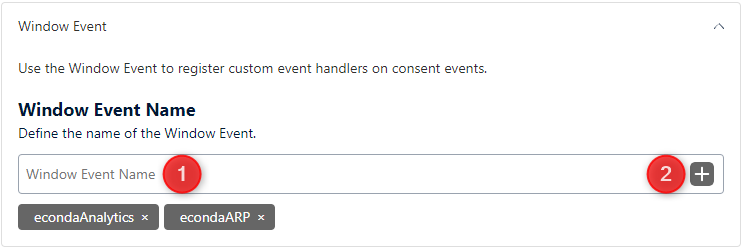
Enter in the field Data Layer Name (1) both names one after another econdaAnalytics and econdaARP.
Add both names each with a click at + (2).
Enable the switch at
consents_initialized_storage
consents_initialized_setting
consents_changed
specific_consents_changed

Hint
If window events are already used with these settings, at data layer name only the two names*econdaAnalytics* and econdaArp should be added.
To save the modifications, click on save setting in the menu.
Customizations in Analytics
Analytics JS Library
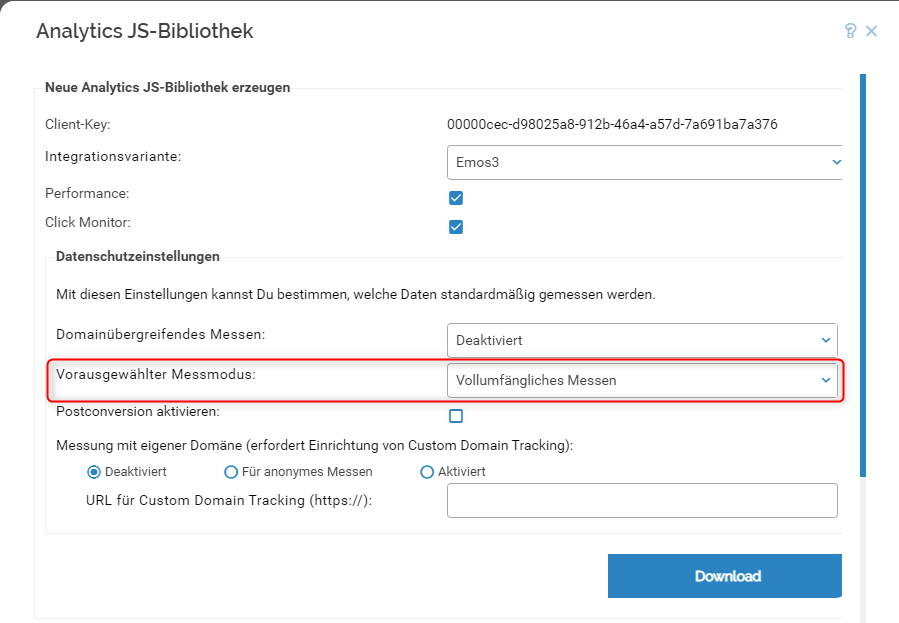
Select anonymous measurement as pre-defined measuring mode in the data protection settings.
After downloading the Analytics JS Library must be swapped on your website.
Customizations on your website
Integration of user centric scripts
Find out `here <https://usercentrics.com/de/knowledge/usercentrics-skript-direkt-in-deine-website-einbinden/>`how you integrate usercentric script into your website.
Customization Analytics Integration
You do not need to customize the Analytics integration, as anonymous measurment is set as pre-defined measuring mode.
Customization Personalization Widget Integration
You do not need to customize widget integration.
Additional script to control the Analytics measuring mode (privacy mode) with ARP
<script>
//Script zur Steuerung des Analytics Messmodus (Privacy Mode) mit ARP
window.addEventListener("econda_uc", function (e) {

  window.econda.ready(() => {

    if (e.detail.event === "consent_status" && e.detail["econda Analytics"] === false)
            {
                if (e.detail.event === "consent_status" && e.detail["econda ARP"] === true)
                    {
                    localStorage.setItem('emos_privacy','3')
                    if (window.econda.arp.PrivacyProtection.getProfileState() !== 'ALLOW'){
                        try {
                                window.econda.arp.PrivacyProtection.updatePermissions([{
                                  state: 'ALLOW',
                                  version: '5.0',
                                  timestamp: new Date().toISOString()
                                }]);

                            }

                            catch (e) {console.error('Could not update econda Privacy Protection settings.')}
                        }
                    }

                    else if (e.detail.event === "consent_status" && e.detail["econda ARP"] === false)
                        {
                            localStorage.setItem('emos_privacy','2');
                            if (window.econda.arp.PrivacyProtection.getProfileState() !== 'DENY'){
                                try {
                                        window.econda.arp.PrivacyProtection.updatePermissions([{
                                          state: 'DENY',
                                          version: '5.0',
                                          timestamp: new Date().toISOString()
                                        }]);

                                    }
                                    catch (e) {console.error('Could not update econda Privacy Protection settings.')}
                        }
                    }
            }
    else if (e.detail.event === "consent_status" && e.detail["econda Analytics"] === true)
            {

                if (e.detail.event === "consent_status" && e.detail["econda ARP"] === true)
                  {
                    localStorage.setItem('emos_privacy','3')
                    if (window.econda.arp.PrivacyProtection.getProfileState() !== 'ALLOW'){
                        try {
                                window.econda.arp.PrivacyProtection.updatePermissions([{
                                  state: 'ALLOW',
                                  version: '5.0',
                                  timestamp: new Date().toISOString()
                                }]);

                            }

                            catch (e) {console.error('Could not update econda Privacy Protection settings.')}
                        }
                    }

                    else if (e.detail.event === "consent_status" && e.detail["econda ARP"] === false)
                        {
                            localStorage.setItem('emos_privacy','3')
                            if (window.econda.arp.PrivacyProtection.getProfileState() !== 'DENY'){
                                try {
                                        window.econda.arp.PrivacyProtection.updatePermissions([{
                                          state: 'DENY',
                                          version: '5.0',
                                          timestamp: new Date().toISOString()
                                        }])

                                    }
                                    catch (e) {console.error('Could not update econda Privacy Protection settings.')}
                        }
                    }
           }
        });
    });
</script>
Additional script to control the Analytics measuring mode (privacy mode) without ARP
<script>
    window.addEventListener("econda_uc", function (e) {
        if ((e.event === "consent_changed" || e.event === "consents_initialized" ) && e.data["econda Analytics"] === false)
            {
                try {localStorage.setItem('emos_privacy','2')} catch (e) {console.error('Could not set econda privacy mode.')}
            }
        else if ((e.event === "consent_changed" || e.event === "consents_initialized" ) && e.data["econda Analytics"] === true)
            {
                try {localStorage.setItem('emos_privacy','3')} catch (e) {console.error('Could not set econda privacy mode.')};
            }
    });
</script>