DYMATRIX in Usercentrics CMP V2 einbinden
Du kannst in die Usercentrics Consent Management Platform einbinden.
Vorgehen im Überblick:
Nimm die Konfiguration in Usercentrics vor: Lege dafür Data Processing Services und ein Window Event an.
Nimm Anpassungen in Analytics vor.
Nimm Anpassungen auf Deiner Website vor
Hinweis
Wie Du von CMP V1 zu CMP V2 wechseln kannst, findest Du hier.
Konfiguration in Usercentrics
Data Processing Services anlegen
Um Data Processing Services anzulegen, gehe folgendermaßen vor:
Navigiere über das Menü zu Service Settings.
Klicke in den Reiter Data Processing Services.
Klicke auf Add DPS via Database.
Tippe in das Suchfeld econda ein.
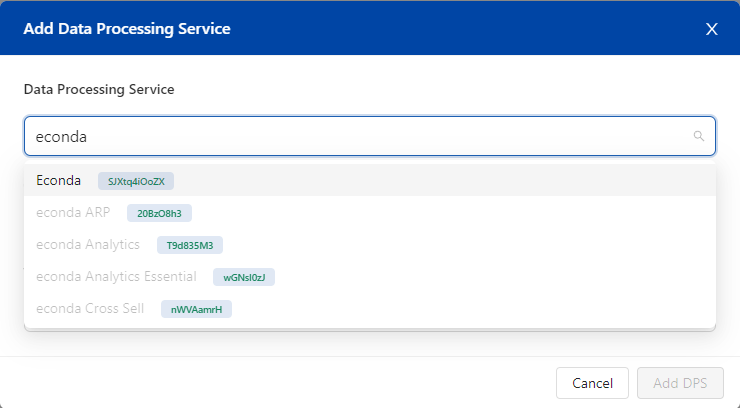
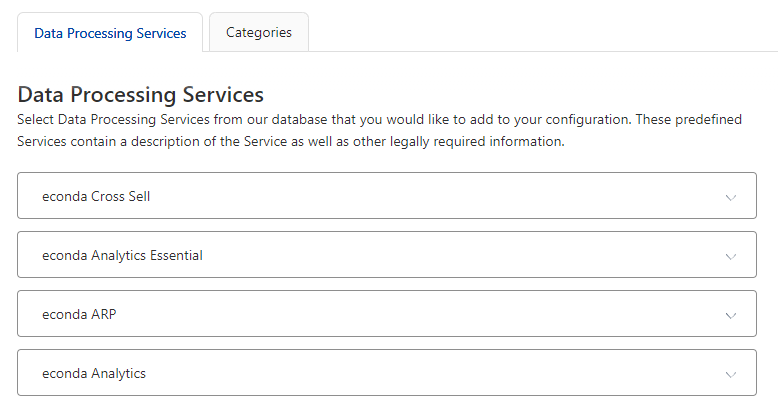
Es müssen folgende Data Processing Services angezeigt werden:
Analytics Essential: Anonyme Datenerfassung ohne Cookies
Analytics: Datenerfassung mit Cookies
Personalization: Ausspielen von Produktempfehlungen
ARP: Personalisierung
Klicke auf Add DPS.
Werden die Data Processing Services nicht angezeigt, gehe für die Konfiguration folgendermaßen vor:
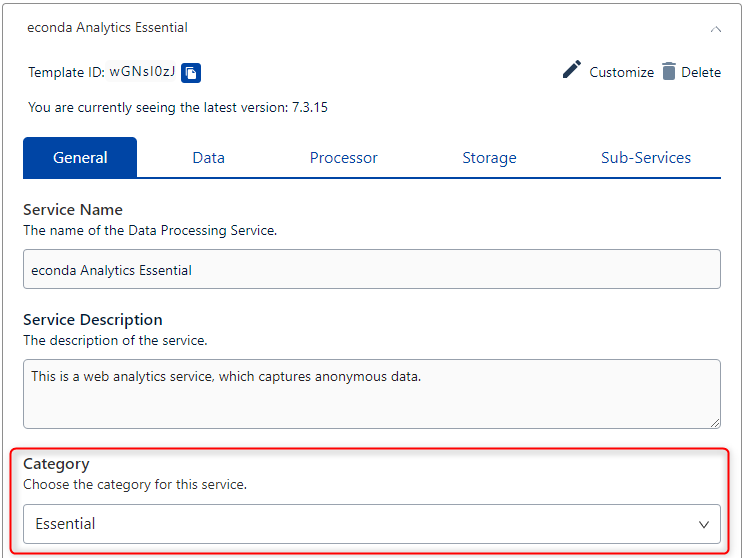
Web Analytics Essential
Wähle im Drop-Down-Menü predefinedConsents Web Analytics Essential aus.
Wähle unter Category Essential aus.
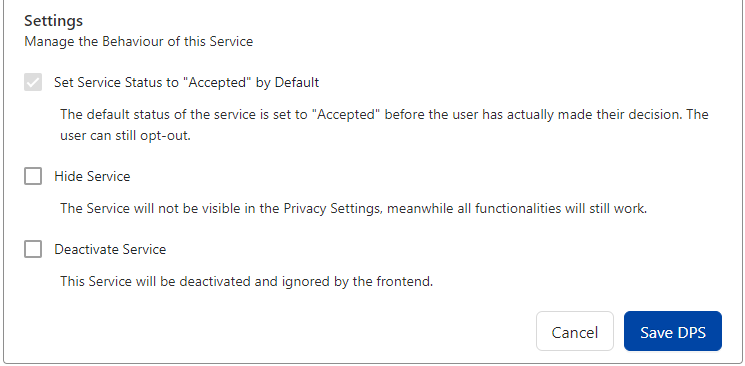
Setze den Haken bei Set Service Status to „Accepted“ by Default.
Klicke auf Save DPS.
Web Analytics
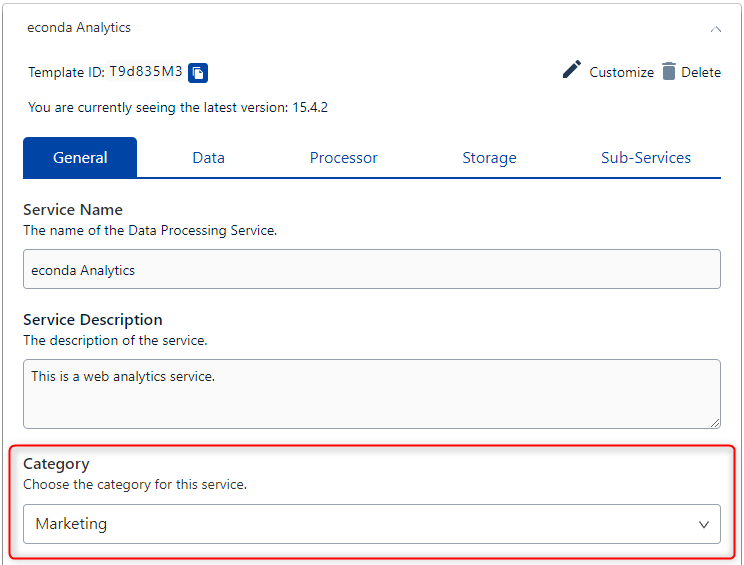
Wähle im Drop-Down-Menü predefinedConsents Web Analytics aus.
Wähle unter Category Marketing aus.
Klicke auf Save DPS.
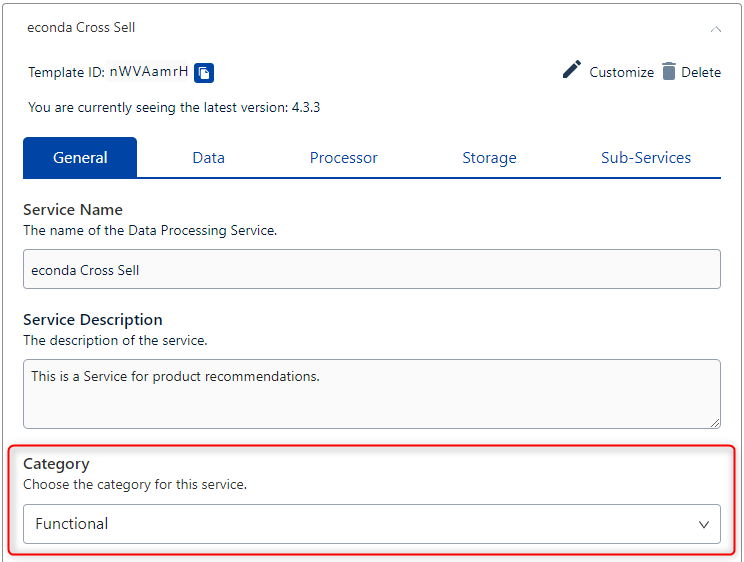
Personalization
Wähle im Drop-Down-Menü predefinedConsents Personalization aus.
Wähle unter Kategorie Functional aus.
Klicke auf Save DPS.
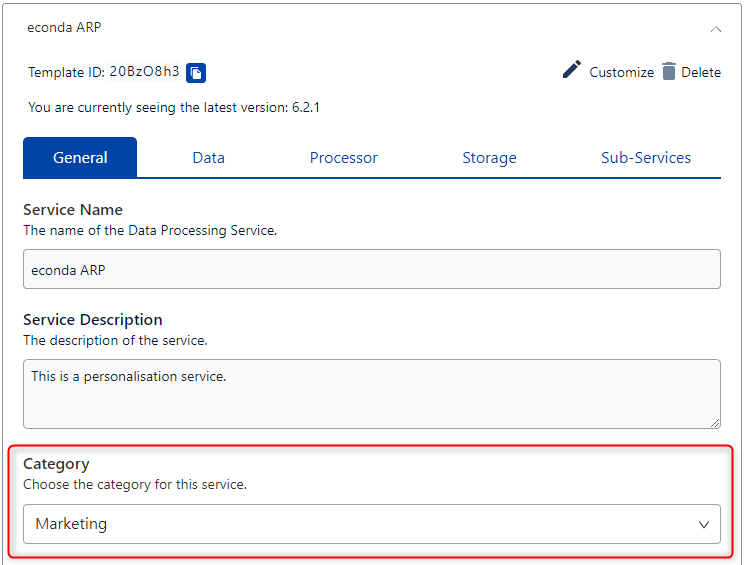
ARP
Wähle im Drop-Down-Menü predefinedConsents ARP aus.
Wähle unter Kategorie Marketing aus.
Klicke auf Save DPS.
Nach diesen Schritten sind alle Data Processing Services angelegt.
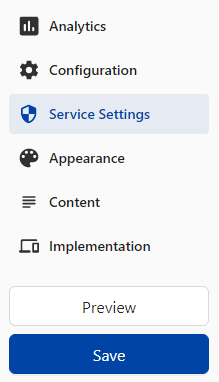
Um die Änderungen zu speichern, klicke im Menü auf Save.
Window Event anlegen
Um DYMATRIX zu verwenden, benötigst Du ein Window Event.
Um das Window Event anzulegen, gehe folgendermaßen vor:
Navigiere über das Menü zu Implementation.
Klicke in den Tab Data Layer & Events.
Klicke auf Window Event.
Gib im Feld Window Event Name (1) den Namen econda_uc ein.
Füge den Namen mit einem Klick auf + (2) hinzu.
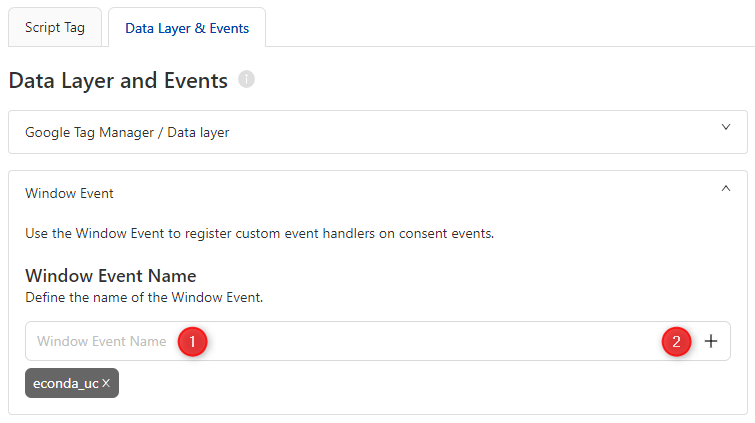
Um die Änderungen zu speichern, klicke im Menü auf Publish.
Anpassungen in Analytics
Analytics JS-Bibliothek
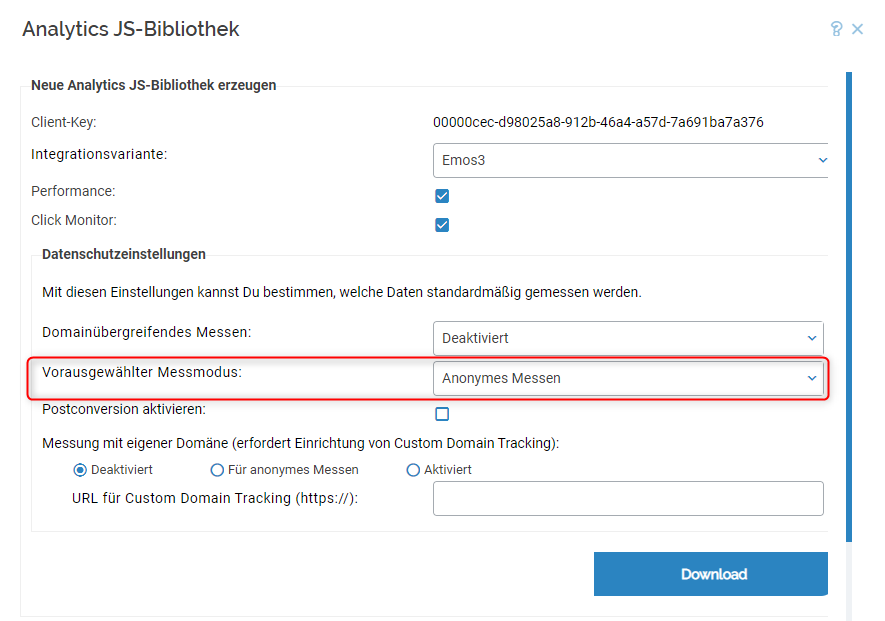
Stelle in den Datenschutzeinstellungen Anonymes Messen als Vorausgewählter Messmodus ein.
Nach dem Herunterladen muss die Analytics JS-Bibliothek auf Deiner Website ausgetauscht werden.
Anpassungen auf Deiner Website
Einbinden des Usercentrics Scripts
Wie Du das Usercentrics Script auf Deiner Website einbindest findet Du hier.
Anpassung Analytics Integration
Du musst die Analytics Einbindung nicht anpassen, da Anonymes Messen als vorausgewählter Messmodus eingestellt ist.
Anpassung Personalization Widget Integration
Du musst die Widget-Einbindung nicht anpassen.
Zusätzliches Script zur Steuerung des Analytics Messmodus (Privacy Mode) mit ARP
<script>
//Script to control the Analytics measurement mode (Privacy Mode) with ARP
//If necessary, please set OPTIONAL_CONTENT_LABEL

window.addEventListener("econda_uc", function (e) {

    window.econda.ready(() => {

        if (e.detail.event === "consent_status" && e.detail["econda Analytics"] === false) {
            if (e.detail.event === "consent_status" && e.detail["econda ARP"] === true) {
                if(localStorage.getItem("emos_privacy") !== null) {
                    window.emos3.send({'privacy_mode':3});
                }

                if (window.econda.arp.PrivacyProtection.getProfileState() !== 'ALLOW') {
                    try {
                        window.econda.arp.PrivacyProtection.updatePermissions([{
                            state: 'ALLOW',
                            version: '5.0',
                            timestamp: new Date().toISOString()
                        }],OPTIONAL_CONTENT_LABEL);
                    }
                    catch (e) {console.error('Could not update econda Privacy Protection settings.')}
                }
            }
            else if (e.detail.event === "consent_status" && e.detail["econda ARP"] === false) {
                if(localStorage.getItem("emos_privacy") !== null) {
                    window.emos3.send({'privacy_mode': 'reset'});
                }

                if (window.econda.arp.PrivacyProtection.getProfileState() !== 'DENY') {
                    try {
                        window.econda.arp.PrivacyProtection.updatePermissions([{
                            state: 'DENY',
                            version: '5.0',
                            timestamp: new Date().toISOString()
                        }],OPTIONAL_CONTENT_LABEL);
                    }
                    catch (e) {console.error('Could not update econda Privacy Protection settings.')}
                }
            }
        }
        else if (e.detail.event === "consent_status" && e.detail["econda Analytics"] === true) {
            if (e.detail.event === "consent_status" && e.detail["econda ARP"] === true) {
                if(localStorage.getItem("emos_privacy") !== '3') {
                    window.emos3.send({'privacy_mode':3});
                }

                if (window.econda.arp.PrivacyProtection.getProfileState() !== 'ALLOW') {
                    try {
                        window.econda.arp.PrivacyProtection.updatePermissions([{
                            state: 'ALLOW',
                            version: '5.0',
                            timestamp: new Date().toISOString()
                        }],OPTIONAL_CONTENT_LABEL);
                    }
                    catch (e) {console.error('Could not update econda Privacy Protection settings.')}
                }
            }
            else if (e.detail.event === "consent_status" && e.detail["econda ARP"] === false) {
                if(localStorage.getItem("emos_privacy") !== '3') {
                    window.emos3.send({'privacy_mode':3});
                            }

                if (window.econda.arp.PrivacyProtection.getProfileState() !== 'DENY') {
                    try {
                        window.econda.arp.PrivacyProtection.updatePermissions([{
                            state: 'DENY',
                            version: '5.0',
                            timestamp: new Date().toISOString()
                        }],OPTIONAL_CONTENT_LABEL)
                    }
                    catch (e) {console.error('Could not update econda Privacy Protection settings.')}
                }
            }
        }
    });
});
</script>
Hinweis
Falls `OPTIONAL_CONTENT_LABEL` definiert ist, wird dieser Wert als Content-Label für das Tracking verwendet.
Ist kein Wert gesetzt, wird standardmäßig „arp-privacy-protection/permission-update“ verwendet.
Zusätzliches Script zur Steuerung des Analytics Messmodus (Privacy Mode) ohne ARP
<script>
//Additional script to control the Analytics measurement mode (Privacy Mode) without ARP

    window.addEventListener("econda_uc", function (e) {
        if ((e.detail.event === "consent_status") && e.detail["econda Analytics"] === false) {
            if(localStorage.getItem("emos_privacy") !== null) {
                                window.emos3.send({'privacy_mode': 'reset'});
            }
        }
        else if ((e.detail.event === "consent_status") && e.detail["econda Analytics"] === true) {
            if(localStorage.getItem("emos_privacy") !== '3') {
                                window.emos3.send({'privacy_mode':3});
                        }
        }
    });
</script>
Hinweis
Beachte: Das ARP-SDK muss geladen werden. Wie Du das sicherstellen kannst, findest Du hier.